DayVera text messages
DayVera sends two kinds of text message, each as its own program with its own number: sign-in codes, sent only when a person asks for one, and work texts, sent by a business to its own team through DayVera, only to people who have agreed to them. No marketing or promotional messages are sent.
DayVera sign-in codes
Shown under "Send code" on the sign-in screen:
If you enter a mobile number, DayVera (Endless Software LLC) will text a one-time sign-in code to it. Msg frequency varies. Msg & data rates may apply. Reply HELP for help, STOP to cancel.
Shown above "Text me a code" on the sign-up form, with links to the Privacy Policy and Terms:
By tapping “Text me a code”, you agree that DayVera (Endless Software LLC) may text a one-time code to this number, and short notices about your own DayVera account. Msg frequency varies. Msg & data rates may apply. Reply HELP for help, STOP to cancel.
DayVera work texts
A business that uses DayVera can text its own employees about their work. Each text starts with the employee's store, for example "Sunny Day Bakery via DayVera:".
How employees opt in
- The employee signs in to DayVera as themself.
- Once their business has work texts on, the app shows them the full wording below, the statement that mobile information is not shared for marketing, and links to the Privacy Policy and SMS Terms, all above a consent checkbox labelled I agree to receive DayVera work texts from my store. Nothing is folded away. The checkbox is unchecked by default and it is optional. The wording carries the employee's own store names in place of [your store's name].
- Nothing is texted under this program until the employee ticks the box and saves. Signing in is not consent.
- After they opt in, they receive one confirmation text, for example: Sunny Day Bakery via DayVera: You're signed up for DayVera work texts. Msg frequency varies. Msg & data rates may apply. Reply HELP for help, STOP to opt out. The first work text after that ends with "Reply STOP to opt out."
There is no form on this page and nothing here to submit. Below are the label and the exact wording of the checkbox shown inside the DayVera app.
Checkbox label: I agree to receive DayVera work texts from my store
I agree to receive text messages from [your store's name] via DayVera about my work: new and changed schedules, open shifts and requests to cover a shift, alerts when a scheduled shift is late or missed, direct messages from my team, and decisions on my time-off requests. Message frequency varies. Message and data rates may apply. Reply HELP for help, STOP to cancel. Consent is optional. It is not required to use DayVera, to receive in-app notifications, or as a condition of employment. See the Privacy Policy at /privacy and the SMS Terms at /terms.
Mobile information will not be sold or shared with third parties for promotional or marketing purposes.
Consent text version sms-consent-2026-11-17.v3.
See the Privacy Policy and the SMS Terms.
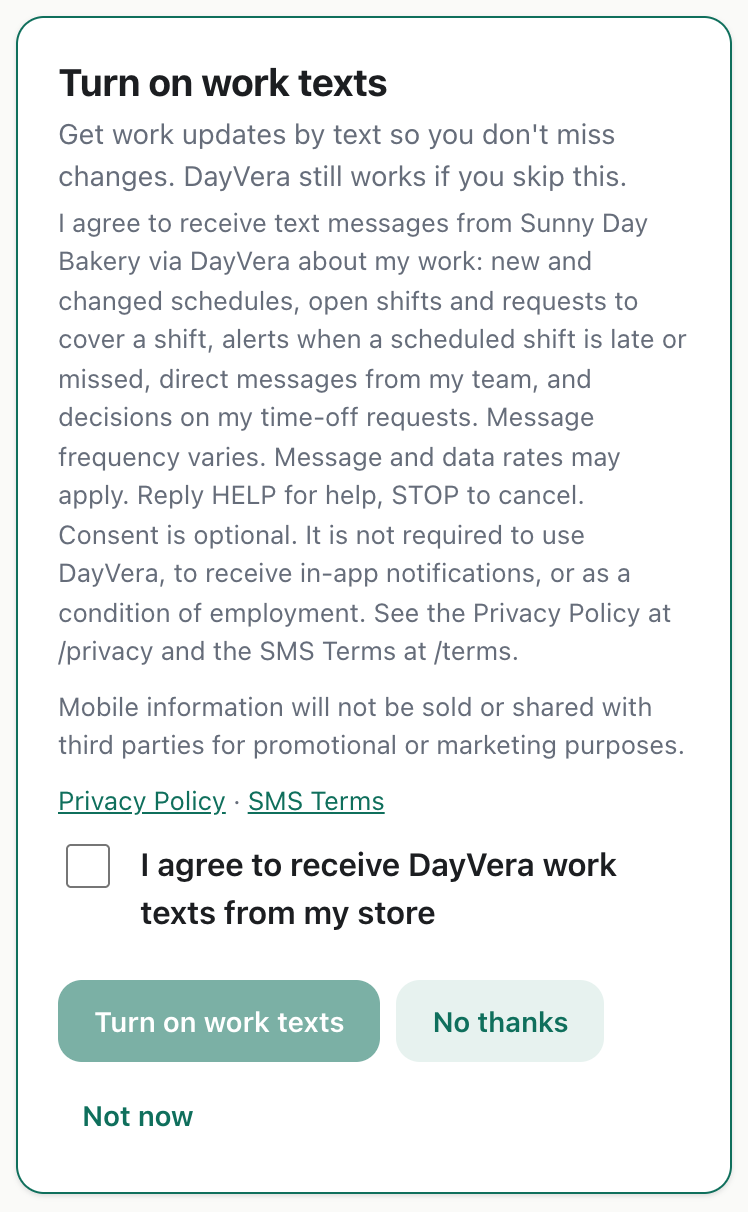
Example for an employee of Sunny Day Bakery. The box is unchecked until they tick it.
Checkbox label: I agree to receive DayVera work texts from my store
I agree to receive text messages from Sunny Day Bakery via DayVera about my work: new and changed schedules, open shifts and requests to cover a shift, alerts when a scheduled shift is late or missed, direct messages from my team, and decisions on my time-off requests. Message frequency varies. Message and data rates may apply. Reply HELP for help, STOP to cancel. Consent is optional. It is not required to use DayVera, to receive in-app notifications, or as a condition of employment. See the Privacy Policy at /privacy and the SMS Terms at /terms.
Withdrawing consent
An employee can withdraw at any time: in the DayVera app, or by replying STOP to any work text.
Keyword replies
These replies are sent by our messaging provider from the registered keyword texts, not by the DayVera application.
The HELP text registered for the program names the employee's store:
[your store's name] via DayVera: For help contact your manager or email support@dayvera.team. Msg frequency varies. Msg & data rates may apply. Reply STOP to cancel.
The automatic reply to HELP cannot know which store a number belongs to, so it reads:
DayVera: For help contact your manager or email support@dayvera.team. Msg frequency varies. Msg & data rates may apply. Reply STOP to cancel.
Reply STOP:
DayVera: You're unsubscribed and won't get more texts from this number. Reply START to resubscribe.
Reply START after a STOP to receive texts from this number again. Work texts also need to be turned on in the DayVera app; START alone does not turn them back on:
DayVera: You can get work texts again. Turn them on in the DayVera app. Msg frequency varies. Msg & data rates may apply. Reply HELP for help, STOP to opt out.
Message frequency and rates
Message frequency varies. Message and data rates may apply.
Support
For help with texts, contact your manager or email support@dayvera.team.